Setting Up a Data Room in Google Drive: Quick Outlook & Robust alternative – DeelTrix
Many founders, investment bankers, and M&A teams initially consider setting up a data room in google drive because Google Drive is free, familiar, and easy to use. While Google Drive offers basic file sharing, it lacks the professional-level security, analytics, and permissions required for due diligence or investor sharing.
This guide walks you step-by-step through setting up a data room in google drive, its limitations, and why professional data room platforms like DeelTrix are a better choice for high-stake deals.
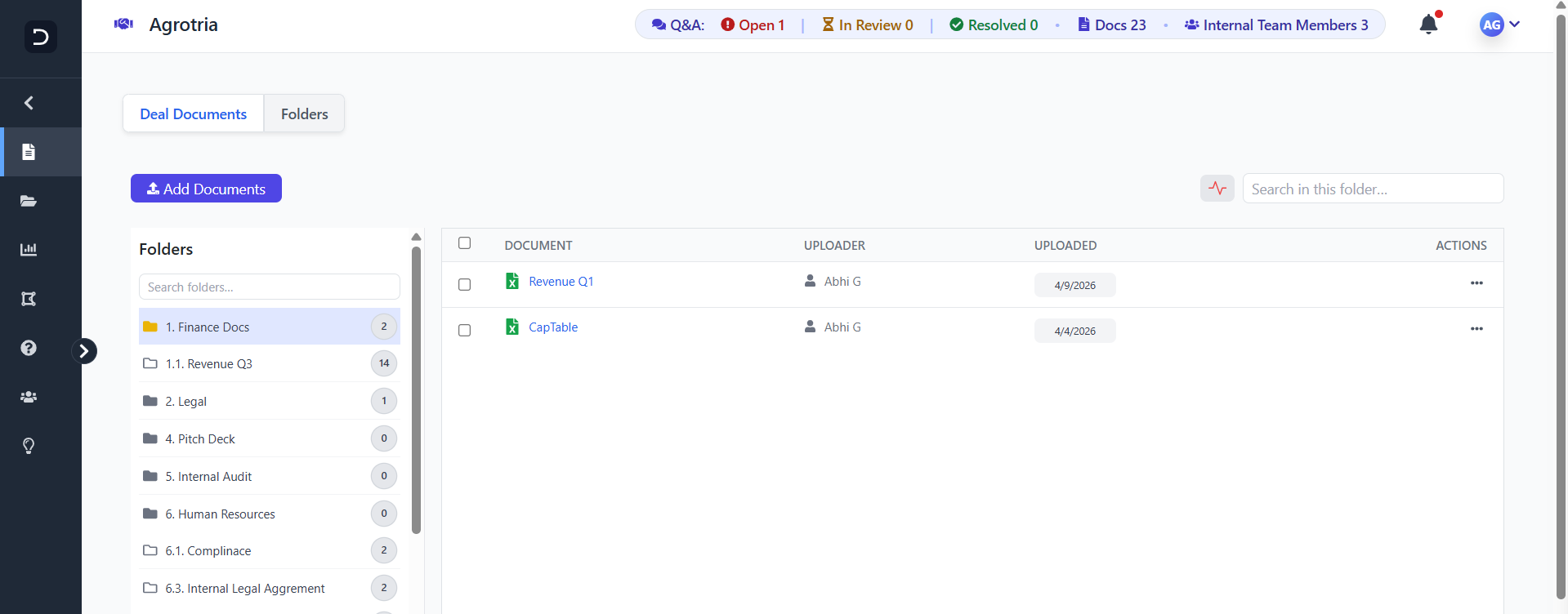
Secure, Smart & Built for Deals
Manage your documents with complete control using DeelTrix. From advanced permissions to real-time analytics, everything is designed to help you close deals faster and more securely.
Get Started1. What Does Setting Up a Data Room in Google Drive Mean?
Setting up a data room in google drive means organizing confidential documents into structured folders and sharing them with investors, advisors, and internal teams. It works for:
- Early-stage fundraising
- Simple document sharing
- Team collaboration
- Lite due diligence
However, when setting up a data room in google drive, users often realize Google Drive does not support granular permissions, watermarking, page-level analytics, or audit trails.
2. Step-by-Step Guide to Setting Up a Data Room in Google Drive
If you’re setting up a data room in google drive, follow these steps:
Step 1: Create a Master Folder
Start by creating a main folder named “Company Data Room” or your project name.
Step 2: Build a Clean Folder Structure
When setting up a data room in google drive, structure matters more than anything.
Suggested folders:
- Company Overview
- Financials
- Legal
- Team
- Product & Tech
- Traction
- Market Research
- Investor Documents
Step 3: Upload Documents in Logical Order
Use PDF for final versions. Use read-only where possible.
Step 4: Set Permissions Carefully
A crucial step when setting up a data room in google drive is restricting document access.
However, Drive only offers:
- Viewer
- Commenter
- Editor
It cannot:
- Block downloads
- Apply watermarks
- Track time spent per document
Step 5: Share Folder with Investors
When setting up a data room in google drive, ensure you never use “Anyone with link.”
Share only with emails of trusted investors.
Step 6: Monitor Activity
Google Drive shows only basic activity logs—making it limited for due diligence.
3. Pros & Cons of Setting Up a Data Room in Google Drive
✔ Pros
- Free
- Easy to use
- Quick to set up
- Works well for small teams
✘ Cons
When setting up a data room in google drive, founders quickly face limitations:
- No analytics (no “who viewed / for how long”)
- No dynamic watermarking
- No expiry per user
- No granular permissions
- No audit trail
- No branded experience
- No secure viewer
For serious investors, these limitations reduce trust and slow down due diligence.
4. Why Google Drive Isn’t a True Data Room
Even after setting up a data room in google drive, you still lack:
- Document view security
- User tracking
- NDA automation
- Page-level analytics
- Real-time engagement insights
This is why startups eventually shift from setting up a data room in google drive to professional, purpose-built data room software.
5. Best Alternative to Setting Up a Data Room in Google Drive – DeelTrix
If your goal is to attract investors, protect sensitive documents, and track engagement, DeelTrix is built exactly for that. It solves every limitation of setting up a data room in google drive.
DeelTrix Feature Comparison (Professional Data Room)
| Feature / Capability | DeelTrix |
|---|---|
| Purpose-Built for Fundraising, M&A & Due Diligence | ✅ Designed specifically for deal workflows |
| Granular Document Permissions | ✅ View, download block, expiry, watermark |
| Data Room Structure | ✅ Hierarchical folders & multiple parallel rooms |
| Real-Time Analytics | ✅ Tracks who viewed, what page, how long |
| Collaboration Tools | ✅ Q&A, Comments |
| Multi-User Roles | ✅ Admin, Viewer, Contributor |
| Dynamic Watermarking | ✅ Enabled |
| One Click Update | ✅ Notify all room users instantly |
| Document Support | ✅ PDF, DOCX, XLSX, PPTX & more |
| Custom Branding | ✅ Your own logo & theme |
| Secure Viewing | ✅ Download block, view-only, watermark |
| Notifications | ✅ Alerts for views, downloads, comments |
| Compliance & Audit Trail | ✅ Full logs, GDPR-compliant |
| Trial | ✅ Yes |
| Pricing | ✅ Startup-friendly, no per-page or per-room fees |
6. When to Stop Setting Up a Data Room in Google Drive and Upgrade
You should stop setting up a data room in google drive immediately if:
- You’re sharing cap table, financials, term sheets
- Investors request view tracking
- You need confidentiality
- You want to avoid data leaks
- You need a professional audit trail
Serious fundraising demands more than Google Drive can provide.
7. Final Verdict: Should You Be Setting Up a Data Room in Google Drive?
You can start with setting up a data room in google drive, but it’s only suitable for:
- Early-stage documents
- Basic file sharing
- Temporary collaboration
- Non-sensitive information
For investor-ready, secure, audit-proof document sharing, a professional platform like DeelTrix is the much stronger choice.
If your goal is to protect documents, track investor interest, and manage true due diligence, then after setting up a data room in google drive, your next step should be upgrading to DeelTrix.
FAQ’s
1. Can I use Google Drive as a data room for fundraising?
Yes, you can use Google Drive to store and share documents, but it lacks advanced data room features like detailed analytics, document tracking, and investor-level permissions.
2. What are the limitations of using Google Drive as a data room?
Google Drive does not provide granular access control, dynamic watermarking, or visibility into who viewed which document—features that are critical during fundraising and due diligence.
3. How do I organize a data room in Google Drive?
You can create folders for sections like Pitch Deck, Financials, Legal, and Team. However, maintaining structure and version control becomes difficult as more investors access the files.
4. Can I track investor activity in Google Drive?
No, Google Drive offers very limited tracking. You won’t know which investor viewed which file or how much time they spent—insights that are crucial during fundraising.
5. Is Google Drive secure enough for fundraising documents?
While Google Drive provides basic security, it lacks advanced protections like dynamic watermarking, document expiry, and controlled access levels that dedicated data rooms offer.
6. How do permissions work in Google Drive vs a data room?
Google Drive allows basic sharing (view/edit), but it doesn’t support investor-specific permissions, restricted downloads, or detailed control over document actions like a proper data room.
7. What makes DeelTrix better than Google Drive for data rooms?
DeelTrix is built specifically for fundraising. It offers advanced features like page-level analytics, investor tracking, dynamic watermarking, and structured document workflows—everything Google Drive lacks.
8. Can I present my startup more professionally using a data room?
Yes. A dedicated platform like DeelTrix creates a structured, branded experience for investors, while Google Drive often feels unorganized and informal.
9. How does DeelTrix improve investor engagement compared to Google Drive?
DeelTrix provides real-time insights into investor behavior—like who viewed your pitch deck and for how long—helping you follow up strategically and close deals faster.
10. Is DeelTrix secure for sensitive document sharing?
Yes. DeelTrix is ISO Certified and ensure data residency by allowing user select their data room location for file storage


Share investor decks securely with live updates, page analytics, and instant revocation controls.
Organize financials, contracts, and compliance docs in one secure room with audit trails.
Control sensitive contracts and regulatory files with watermarking and access restrictions.
Send proposals with engagement signals and track which sections prospects value most.
Distribute reports with visibility into reader activity and keep conversations in-platform.

