SecureDocs Virtual Data Room: Complete editors pick guide on features, pricing & top rated alternative

SecureDocs Virtual Data Room has long been recognized as a trusted virtual data room solution for managing due diligence, mergers, and secure collaboration. However, in 2026, modern dealmakers are shifting toward platforms like DeelTrix, which offer advanced analytics, collaboration, and customizable branding that go beyond what the SecureDocs Virtual Data Room provides.
While the SecureDocs Virtual Data Room remains a reliable choice for basic file sharing and compliance, DeelTrix represents a new generation of virtual data room software that merges intelligence, security, and user experience for today’s complex data room due diligence workflows.
DeelTrix vs SecureDocs – Feature Comparison
Overview of the SecureDocs Virtual Data Room
The SecureDocs Virtual Data Room was built to simplify file storage and enable secure document sharing during M&A and fundraising. It’s positioned as one of the accessible virtual data room providers for companies seeking speed and simplicity. However, as deal processes evolve, professionals increasingly need data protection platforms that include advanced automation, detailed analytics, and team collaboration — areas where DeelTrix excels.
Both the SecureDocs Virtual Data Room and DeelTrix enable document uploads, permissions, and reporting, but DeelTrix adds features like activity monitoring, dynamic watermarking, and secure data analytics that help teams make faster, data-driven decisions.
Key Features of the SecureDocs Virtual Data Room
When evaluating the SecureDocs Virtual Data Room, deal teams should look beyond basic document storage and compare how each platform supports security, collaboration, access management, analytics, and transaction execution. DeelTrix provides a broader set of transaction-focused capabilities designed for M&A, fundraising, due diligence, and investor engagement.

1. Fast Setup and File Organization
The SecureDocs Virtual Data Room is designed to provide a straightforward environment for uploading and organizing confidential documents. This can be useful for teams that need to establish a transaction workspace quickly.
DeelTrix builds on this requirement with structured folders, multiple data rooms, granular permissions, and transaction-focused document management.
For example, an M&A advisory firm could create separate DeelTrix data rooms for three active transactions:
- Acquisition of Company A
- Sale of Company B
- Fundraising for Company C
Each transaction can have its own documents, users, permissions, and activity.
This makes DeelTrix a strong alternative to the SecureDocs Virtual Data Room for teams managing multiple concurrent projects.
2. Advanced Document Access Controls
The SecureDocs Virtual Data Room provides controlled access to confidential documents. However, deal teams often need more granular control as a transaction progresses.
DeelTrix allows administrators to configure different access levels, including:
- View-only access
- Print access
- Download access
- Restricted access
- Role-based permissions
For example, during early M&A diligence, a prospective buyer might receive view-only access to financial information. Once the buyer progresses into detailed diligence, selected download permissions can be granted.
This allows access to evolve with the deal rather than remaining static.
3. User Groups for Complex Transactions
A major DeelTrix advantage over the SecureDocs Virtual Data Room is its focus on User Groups.
M&A transactions can involve several participant categories:
| User Group | Example |
|---|---|
| Buyer A | Strategic acquisition team |
| Buyer B | Private equity buyer |
| Legal Advisors | External legal counsel |
| Financial Advisors | Accounting and financial team |
| Seller Team | Management and finance |
| Management | Selected company executives |
DeelTrix User Groups allow administrators to organize participants according to their transaction role.
This becomes particularly valuable when multiple buyers are reviewing the same transaction but should not necessarily receive identical access.
4. User Groups Analytics
The SecureDocs Virtual Data Room can provide transaction activity information, but DeelTrix extends engagement intelligence through User Groups Analytics.
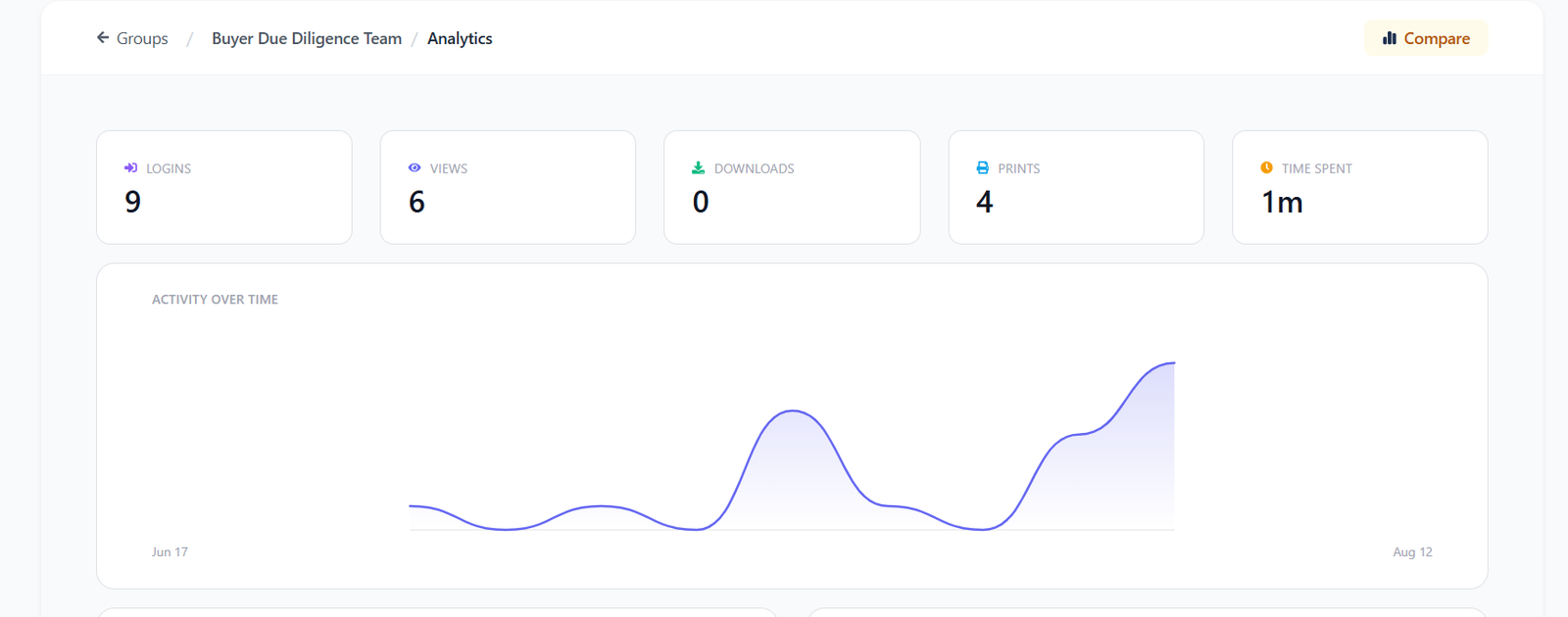
Consider a competitive M&A process with three buyers.
Buyer A may spend significant time reviewing financial documents, Buyer B may focus on customer contracts, and Buyer C may concentrate on intellectual property.
DeelTrix can help transaction teams compare these engagement patterns across groups.
This gives an investment banker or seller additional information before buyer meetings and negotiations.
Instead of asking only, “Who entered the data room?”, the team can investigate how different groups are engaging with the transaction materials.
5. Collaboration and Q&A

The SecureDocs Virtual Data Room can support transaction collaboration and Q&A workflows. DeelTrix also provides Q&A and collaboration functionality while combining these capabilities with document engagement information.
For example, a buyer may ask a question about a revenue contract.
The seller’s team can:
- Receive the question
- Review the relevant document
- Coordinate an internal response
- Track the question
- Provide the response
- Maintain the transaction record
This can reduce reliance on disconnected email threads and make due diligence easier to manage.
6. Dynamic Watermarking
The SecureDocs Virtual Data Room provides document protection capabilities, while DeelTrix includes dynamic watermarking as part of its document security toolkit.
Watermarks can help identify the person viewing a confidential document and can incorporate relevant information such as viewer identity and timestamps, depending on configuration.
For example, a seller sharing a confidential customer list with a buyer can apply dynamic watermarking to make the document more traceable.
This is useful for:
- Customer lists
- Financial models
- Pricing information
- Legal contracts
- Intellectual property
- Strategic plans
7. Protected Viewport
One area where DeelTrix can provide additional protection is its Protected Viewport capability.
The SecureDocs Virtual Data Room may provide conventional document security controls, but DeelTrix is designed to add protection around the document viewing experience itself.
For example, a buyer reviewing a confidential financial forecast may be working in a shared office or moving between applications. Protected Viewport can help create a more controlled environment for viewing sensitive information.
This makes it particularly relevant for highly confidential M&A and fundraising documents.
8. Focus Lock
DeelTrix also provides Focus Lock as an additional document-viewing protection.
Imagine a buyer is reviewing a confidential acquisition valuation and moves away from the active document view. Focus Lock is designed to help protect the sensitive content when the viewer is no longer focused on the document.
This creates another layer beyond conventional password protection and access permissions.
For teams comparing the SecureDocs Virtual Data Room with newer VDR capabilities, this type of viewing protection can be an important consideration.
9. Document Engagement Analytics
The SecureDocs Virtual Data Room can provide reporting and activity information, while DeelTrix places greater emphasis on document engagement.
DeelTrix can provide visibility into areas such as:
- Document views
- Downloads
- User activity
- Page-level engagement
- Time spent
- Engagement trends
For example, an M&A advisor may discover that buyers repeatedly review the working-capital section of the financial documents.
That insight can help the advisor anticipate questions before the next management meeting.
10. Activity Monitoring
The SecureDocs Virtual Data Room can help teams monitor transaction activity, but DeelTrix combines activity monitoring with broader engagement analytics.
Instead of simply maintaining an activity record, deal teams can use engagement information to understand participant behavior.
This can be useful when:
- Comparing potential buyers
- Monitoring investor interest
- Preparing management meetings
- Identifying heavily reviewed documents
- Understanding diligence progress
11. Security and Compliance
Security remains one of the most important requirements for any VDR, including the SecureDocs Virtual Data Room.
DeelTrix provides multiple security-oriented capabilities, including:
- Granular access controls
- Dynamic watermarking
- View-only permissions
- Print and download controls
- Activity tracking
- Protected Viewport
- Focus Lock
- Audit-related activity records
DeelTrix is also ISO certified and provides customers with an option to select a preferred data center location to help address applicable data residency requirements.
12. One Click Update
Another DeelTrix capability is One Click Update.
During an active transaction, documents may change frequently. Updated financial statements, contracts, diligence responses, and presentations may need to be communicated to participants.
One Click Update can help teams distribute relevant updates efficiently.
For example, if a seller uploads an updated financial model, the transaction team can communicate the update to relevant participants without rebuilding the entire document-sharing workflow.
13. Multiple Deal Workspaces
The SecureDocs Virtual Data Room can support transaction workflows, but DeelTrix is designed for teams that may manage several deals simultaneously.
An investment banking firm could maintain:
- M&A Deal 1
- M&A Deal 2
- Fundraising Deal 3
- Strategic Partnership 4
Each can have separate documents, users, permissions, analytics, and Q&A.
This can reduce the risk of mixing information between transactions.
14. Fundraising and Investor Engagement
The SecureDocs Virtual Data Room can be used for confidential transactions, while DeelTrix also supports fundraising workflows.
A startup can create a fundraising data room containing:
- Pitch deck
- Financial projections
- Cap table
- Business plan
- Customer metrics
- Legal documents
- Corporate records
Founders can then monitor investor engagement and understand which materials receive the most attention.
This makes DeelTrix useful beyond traditional M&A transactions.
15. Why DeelTrix Can Be a Strong Alternative
When comparing the SecureDocs Virtual Data Room with DeelTrix, teams should evaluate the entire transaction workflow rather than document storage alone.
DeelTrix combines:
- User Groups
- User Groups Analytics
- Dynamic watermarking
- Protected Viewport
- Focus Lock
- Page-level engagement analytics
- Time-spent analytics
- Q&A
- Granular permissions
- View-only access
- Print and download controls
- One Click Update
- Multiple data rooms
- Document activity tracking
The SecureDocs Virtual Data Room can remain an option for teams seeking established VDR functionality, but DeelTrix can be particularly compelling for organizations wanting stronger engagement intelligence, participant management, and advanced document-viewing controls.
Ultimately, the best choice depends on the transaction’s security requirements, participant structure, analytics needs, collaboration workflow, and budget. For M&A advisors, investment teams, founders, and businesses that want their data room to function as more than a secure file repository, DeelTrix offers a broader transaction-focused approach.
SecureDocs Virtual Data Room Pricing

The SecureDocs Virtual Data Room follows a flat monthly subscription that includes unlimited document uploads and user access. DeelTrix takes transparency even further with virtual pricing that scales as your organization grows.
While SecureDocs Virtual Data Room pricing starts at around $250/month, DeelTrix offers startup-friendly options with no per-page limits, making it one of the most affordable yet comprehensive virtual data room solutions in the market today.
SecureDocs Virtual Data Room Reviews vs DeelTrix Performance
When reading data room reviews, many users highlight the SecureDocs Virtual Data Room’s simplicity and stability. Yet, reviewers often request better UI design, more integrations, and deeper analytics.
DeelTrix bridges these gaps by offering:
- Custom branding and theming options
- Granular role-based permissions
- Real-time activity monitoring and notifications
- Comprehensive due diligence data audit logs
- A modern data protection platform with encryption and watermarking
- Advanced document analytics and viewer insights
This makes DeelTrix not just a secure document sharing platform, but a complete virtual data room software ecosystem for investors, startups, and enterprises alike.
How DeelTrix Outperforms the SecureDocs Virtual Data Room
While the SecureDocs Virtual Data Room serves as a dependable, entry-level tool, DeelTrix delivers enterprise intelligence designed for modern deal workflows. Its blend of secure data analytics, activity monitoring, and smart automation ensures efficient data room due diligence and effortless coordination among teams.
DeelTrix also functions as an advanced data security platform with built-in document analytics, due diligence database support, and real-time secure data room service integration — ensuring faster deal closure, improved compliance, and higher investor confidence.
FAQs About SecureDocs Virtual Data Rooms
1. What are SecureDocs Virtual Data Rooms, and how does DeelTrix compare?
SecureDocs Virtual Data Rooms are designed to help businesses securely organize and share confidential information during M&A, fundraising, due diligence, and other transactions. DeelTrix goes beyond basic VDR functionality by combining secure document sharing with User Groups, User Groups Analytics, Protected Viewport, Focus Lock, document engagement analytics, Q&A, and advanced access controls.
2. What are SecureDocs Virtual Data Rooms used for, and what does DeelTrix add?
SecureDocs Virtual Data Rooms can support M&A, fundraising, business sales, private equity transactions, legal diligence, and corporate transactions.
DeelTrix supports these same types of workflows while adding transaction intelligence and collaboration capabilities, including:
- Document engagement analytics
- User Groups
- Q&A
- Dynamic watermarking
- Protected Viewport
- Focus Lock
- One Click Update
This makes DeelTrix particularly useful when teams need more than secure file storage.
3. Are SecureDocs Virtual Data Rooms suitable for M&A?
Yes, but teams comparing SecureDocs Virtual Data Rooms for M&A should also consider how deeply the platform supports buyer management and transaction intelligence.
DeelTrix provides features designed specifically for M&A workflows, including:
- Buyer-specific User Groups
- User Groups Analytics
- View-only permissions
- Print and download controls
- Dynamic watermarking
- Q&A
- Page-level engagement analytics
- Time-spent analytics
For example, an advisor running a competitive sale can separate Buyer A, Buyer B, and Buyer C into different groups and analyze their engagement.
4. How do SecureDocs Virtual Data Rooms protect confidential documents?
Security is essential for any VDR, but DeelTrix adds several document-protection capabilities that can strengthen the viewing experience.
Alongside granular access permissions and dynamic watermarking, DeelTrix provides Protected Viewport and Focus Lock.
This gives deal teams additional tools for protecting sensitive documents while they are being viewed, rather than relying only on login credentials and download restrictions.
5. Can SecureDocs Virtual Data Rooms control document permissions?
Yes. Permission controls are important in any VDR.
DeelTrix provides granular document permissions that allow teams to configure access such as:
- View only
- Download
- Restricted access
For example, a buyer can receive view-only access during preliminary diligence and receive download permissions later when the transaction progresses.
6. Can SecureDocs Virtual Data Rooms be used for fundraising?
Yes. SecureDocs Virtual Data Rooms can be used to share confidential fundraising materials.
DeelTrix adds investor engagement capabilities that can help founders understand how potential investors interact with their materials.
A founder can share:
- Pitch decks
- Financial projections
- Cap tables
- Business plans
- Customer information
- Legal documents
Then engagement analytics can help identify which materials investors are spending the most time reviewing.
7. How does DeelTrix provide more than SecureDocs Virtual Data Rooms?
DeelTrix combines core VDR functionality with additional deal intelligence and collaboration features.
| Capability | DeelTrix |
|---|---|
| Secure data rooms | ✅ |
| Granular permissions | ✅ |
| Dynamic watermarking | ✅ |
| User Groups | ✅ |
| User Groups Analytics | ✅ |
| Page-level analytics | ✅ |
| Time-spent analytics | ✅ |
| Protected Viewport | ✅ |
| Focus Lock | ✅ |
| Q&A | ✅ |
| View-only access | ✅ |
| Print/download controls | ✅ |
| One Click Update | ✅ |
This combination can make DeelTrix a stronger option for teams wanting a more comprehensive transaction workspace.
8. Do SecureDocs Virtual Data Rooms provide detailed document analytics?
VDR analytics can provide useful information about document activity, but teams should compare the depth of analytics available from each provider.
DeelTrix provides document engagement insights including:
- Document views
- Downloads
- Page-level engagement
- Time spent
- User activity
- Engagement trends
- User Groups Analytics
For example, an M&A advisor can determine whether a buyer is spending significant time reviewing financial projections or customer contracts.
9. What are User Groups in DeelTrix, and why are they better for complex deals?
User Groups allow teams to organize participants according to their role in a transaction.
For example:
| User Group | Purpose |
|---|---|
| Buyer A | Strategic buyer diligence |
| Buyer B | Financial buyer diligence |
| Legal Advisors | Legal review |
| Financial Advisors | Financial review |
| Seller Team | Internal transaction management |
This can be particularly valuable in competitive M&A processes because each group can be managed according to its specific access requirements.
10. What is User Groups Analytics, and how does it improve a VDR?
User Groups Analytics gives transaction teams visibility into engagement across participant groups.
Suppose three buyers are reviewing the same company:
- Buyer A focuses on financial documents.
- Buyer B spends more time on commercial contracts.
- Buyer C reviews intellectual property extensively.
DeelTrix can help advisors understand these patterns, providing information that can be useful when preparing management meetings and assessing buyer interest.
11. Does DeelTrix provide Protected Viewport?
Yes. Protected Viewport is one of the features that differentiates DeelTrix from a basic VDR experience.
It is designed to provide additional protection while confidential documents are being viewed.
This can be particularly useful for:
- Financial models
- Customer lists
- Acquisition valuations
- Strategic plans
- Legal agreements
- Intellectual property
12. What is Focus Lock, and why is it useful?
Focus Lock is another DeelTrix document-viewing protection designed to help safeguard sensitive information when a user moves away from the active document.
For example, a buyer reviewing a confidential acquisition valuation may switch to another browser tab. Focus Lock provides an additional layer of protection around that viewing experience.
This can make DeelTrix particularly attractive for highly sensitive M&A and fundraising workflows.
13. Do SecureDocs Virtual Data Rooms support watermarking, and what does DeelTrix offer?
Watermarking is an important method of protecting confidential documents.
DeelTrix provides dynamic watermarking that can help associate documents with authorized viewers and can include relevant information such as viewer identity and timestamps, depending on configuration.
Combined with User Groups, permissions, and activity analytics, this creates a more controlled document-sharing workflow.
14. Can DeelTrix provide more control throughout different diligence stages?
Yes. DeelTrix allows access permissions to evolve as the transaction progresses.
| Deal Stage | DeelTrix Example |
|---|---|
| Initial review | View only |
| Preliminary diligence | View + limited print |
| Detailed diligence | Selected downloads |
| Negotiation | Controlled broader access |
| Closing | Authorized access |
| Post-transaction | Restrict or revoke |
This allows deal teams to avoid giving maximum permissions to every participant from the beginning.
15. Why should companies consider DeelTrix instead of SecureDocs Virtual Data Rooms?
Companies evaluating SecureDocs Virtual Data Rooms should compare more than basic document storage. They should consider whether the platform provides the security, analytics, participant management, and collaboration capabilities required for modern transactions.
DeelTrix combines:
- User Groups
- User Groups Analytics
- Dynamic watermarking
- Protected Viewport
- Focus Lock
- Page-level engagement
- Time-spent analytics
- Q&A
- Granular permissions
- View-only access
- Print and download controls
- One Click Update
- Multiple data rooms
For M&A advisors, investment teams, founders, and businesses handling confidential transactions, these capabilities make DeelTrix a strong alternative for teams that want their VDR to provide not only secure document storage but also deeper transaction intelligence, participant control, and collaboration.
Final Verdict
Both DeelTrix and the SecureDocs Virtual Data Room cater to professionals handling sensitive business transactions. However, DeelTrix’s next-gen virtual data room solution stands out for its intuitive design, deep analytics, and scalable virtual pricing.
By combining secure document sharing, activity monitoring, and comprehensive data protection platform capabilities, DeelTrix redefines how global teams manage virtual data rooms for mergers and acquisitions and data room due diligence.
For organizations that need precision, insight, and transparency — DeelTrix is the virtual data room software that outperforms every other virtual data room vendor in today’s digital dealmaking era.


Share investor decks securely with live updates, page analytics, and instant revocation controls.
Organize financials, contracts, and compliance docs in one secure room with audit trails.
Control sensitive contracts and regulatory files with watermarking and access restrictions.
Send proposals with engagement signals and track which sections prospects value most.
Distribute reports with visibility into reader activity and keep conversations in-platform.