PDF Link: Quick Overview Table
| Step | Action | Purpose | Features Used |
|---|---|---|---|
|
Step 1
|
Upload document | Centralize file storage securely | Encrypted storage |
|
Step 2
|
Generate link | Easy and controlled sharing | PDF Link creation |
|
Step 3
|
Apply access controls | Restrict unauthorized users | Email verification, password |
|
Step 4
|
Track activity | Monitor engagement | Analytics & notifications |
|
Step 5
|
Set expiry & security | Prevent misuse | Expiration, watermark |
Introduction to PDF Link Sharing
Sharing documents has evolved significantly from email attachments to secure link-based systems. A PDF Link allows you to distribute files without actually sending the file itself, reducing risk and improving control.
In modern workflows, especially in industries like M&A, businesses rely on controlled sharing rather than open distribution. This ensures that only the intended recipient can access the document and under predefined conditions.
With the rise of Data Rooms and Virtual Data Rooms, organizations now expect more than just file sharing—they expect complete visibility and control over how documents are accessed and used.
Why PDF Link is Better Than Traditional Sharing
Traditional file sharing methods like email attachments come with multiple risks, including duplication, forwarding, and lack of tracking. A PDF Link eliminates these issues by keeping the file hosted securely while granting controlled access.
Instead of sending multiple copies of the same file, you can share one centralized version. This ensures consistency and prevents outdated versions from circulating among stakeholders.
In high-stakes scenarios like M&A transactions, this level of control becomes essential, as sensitive documents must remain protected throughout the process.
Step 1: Upload Your Document to a Secure Platform
The first step in creating a PDF Link is uploading your document to a secure environment. This ensures that the file is stored safely and can be accessed only through controlled mechanisms.
Platforms like DeelTrix are specifically designed for this purpose, offering enterprise-grade security and seamless document management.
By using Virtual Data Rooms, you ensure that your files are not just stored but actively protected through encryption and structured access controls.
Step 2: Generate a PDF Link for Sharing
Once your document is uploaded, the next step is to generate a PDF Link that can be shared with your intended audience. This link acts as a gateway to the document without exposing the file itself.
Unlike traditional sharing, this method allows you to maintain control over the document even after it has been shared. You can update permissions, revoke access, or track activity at any time.
This flexibility makes it an ideal solution for businesses managing multiple stakeholders, especially in Data Rooms where document access needs to be tightly controlled.
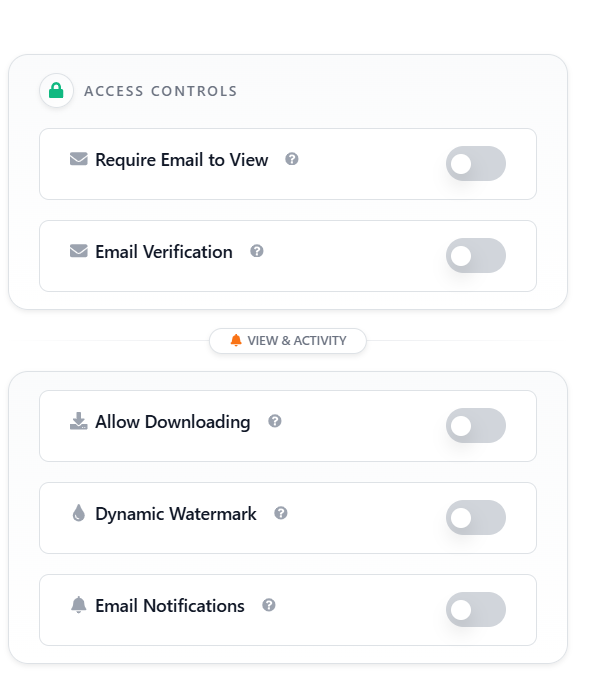
Step 3: Apply Advanced Access Controls
One of the biggest advantages of using a PDF Link is the ability to apply detailed access controls. These controls ensure that only authorized users can view or interact with the document.
Features such as requiring email to view and email verification add an extra layer of security. This ensures that access is granted only to verified individuals, reducing the risk of unauthorized sharing.
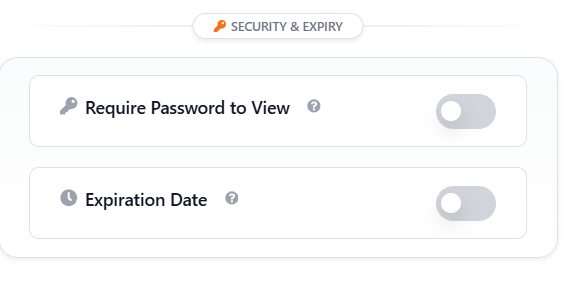
Additionally, you can require a password to view the document, making it even more secure. These controls are essential in Virtual Data Rooms where sensitive information is frequently shared.
Step 4: Enable View & Activity Tracking
Tracking how your document is being used is a critical aspect of secure sharing. A PDF Link allows you to monitor who accessed the file, how long they viewed it, and what actions they took.
This level of insight is particularly useful in M&A scenarios, where understanding stakeholder engagement can influence decision-making. It also helps identify suspicious behavior early.
With platforms like DeelTrix, you receive real-time updates and email notifications whenever someone interacts with your document, ensuring complete transparency.
Step 5: Add Security & Expiry Controls
To prevent misuse, it is important to set security rules on your PDF Link. Features like expiration dates ensure that the link becomes inactive after a certain period.
You can also enable restrictions such as disabling downloads or limiting access to specific users. This ensures that your document remains protected even after sharing.
Dynamic Watermark adds another layer of security by embedding user-specific details into the document, discouraging unauthorized distribution.
DeelTrix: Creating and Sharing Secure PDF Links
Using DeelTrix to create and share a PDF Link is straightforward yet powerful. The platform is designed to simplify secure document sharing while offering advanced features for control and monitoring.
After uploading your document, you can instantly generate a link and customize its settings. This includes enabling email verification, setting passwords, and defining access permissions.
DeelTrix also allows you to manage multiple documents within Data Rooms, making it ideal for teams handling complex workflows like fundraising or M&A transactions.
DeelTrix Features for Secure Document Sharing
Document Access Controls
Access control is at the core of secure sharing. DeelTrix allows you to define who can view, download, or interact with your document.
By setting permissions at a granular level, you ensure that each user only has access to what they need. This reduces the risk of accidental or intentional data leaks.
Such controls are essential in Virtual Data Rooms where multiple stakeholders require different levels of access.
Require Email to View & Email Verification
Requiring users to enter their email before accessing a PDF Link ensures accountability. This feature helps you track exactly who is viewing your document.
Email verification further strengthens security by confirming the identity of the user. This prevents unauthorized individuals from accessing sensitive files.
These features are particularly useful in Data Rooms where maintaining a clear audit trail is critical.
View & Activity Monitoring
Understanding how your document is being used provides valuable insights. DeelTrix offers detailed analytics on user activity, including views, time spent, and interactions.
This information can help you identify engaged stakeholders and prioritize follow-ups. It also allows you to detect unusual activity patterns.
In M&A processes, such insights can be crucial for evaluating interest levels and making informed decisions.
Allow Downloading with Control
While sharing documents, you may want to allow downloads in certain cases. DeelTrix gives you the flexibility to enable or disable this feature based on your requirements.
Even when downloads are allowed, you can still maintain control through features like Dynamic Watermark, ensuring that downloaded files remain traceable.
This balance between accessibility and security is key to effective document sharing.
Dynamic Watermark for Protection
Dynamic Watermark is one of the most effective tools for preventing unauthorized sharing. It overlays user-specific information directly onto the document.
This ensures that any leaked document can be traced back to the source, creating accountability among users.
In Virtual Data Rooms, this feature is widely used to protect sensitive documents during high-stakes transactions.
Email Notifications for Real-Time Updates
Staying informed about document activity is essential for maintaining control. DeelTrix sends real-time email notifications whenever someone interacts with your PDF Link.
This allows you to respond quickly to user actions, whether it’s following up with an interested stakeholder or addressing suspicious behavior.
Such real-time insights enhance the overall efficiency of document sharing processes.
Security & Expiry Settings
Security does not end with access controls—it extends to how long a document remains accessible. DeelTrix allows you to set expiration dates for your PDF Link.
You can also require passwords to view the document, adding another layer of protection. These settings ensure that your files are not accessible indefinitely.
This is especially important in M&A deals where information needs to be tightly controlled over specific timeframes.
Benefits of Using PDF Links in Data Rooms
Using a PDF Link within Data Rooms provides a structured and secure way to manage document sharing. It eliminates the chaos of email-based sharing and ensures centralized control.
With Virtual Data Rooms, you can manage multiple documents, track user activity, and enforce security policies—all from a single platform.
This approach not only improves security but also enhances collaboration, making it easier for teams to work together on complex projects.
Common Mistakes to Avoid When Sharing PDF Links
One common mistake is sharing links without applying proper access controls. This can lead to unauthorized access and potential data leaks.
Another issue is failing to monitor document activity, which can leave you unaware of suspicious behavior. Without tracking, you lose visibility into how your documents are being used.
Not setting expiration dates is another oversight that can compromise security. Always ensure that your PDF Link is active only for as long as necessary.
Best Practices for Secure PDF Link Sharing
Always use a secure platform like DeelTrix to create and manage your PDF Link. This ensures that your documents are protected with advanced security features.
Apply multiple layers of protection, including email verification, passwords, and Dynamic Watermark. This reduces the risk of unauthorized access.
Regularly review activity logs and update access permissions as needed. This proactive approach helps maintain security and control over your documents.
Conclusion
Sharing documents securely is no longer optional—it is a necessity in today’s digital landscape. By using a PDF Link, you can ensure that your files are accessible, controlled, and protected at all times.
Platforms like DeelTrix provide the tools needed to implement secure sharing practices effectively. From access controls to activity tracking, every feature is designed to enhance security.
By following the steps outlined in this guide, you can confidently share documents while maintaining full control and visibility.
FAQ’s
What is a PDF Link and how does it work?
A PDF Link is a secure URL that allows users to access a document without downloading or receiving the file directly, enabling controlled and trackable sharing.
How can I secure a PDF Link before sharing?
You can secure it by enabling email verification, requiring passwords, setting expiration dates, and using features like Dynamic Watermark.
Why should I use Virtual Data Rooms for sharing documents?
Virtual Data Rooms provide advanced security, tracking, and access control features that are essential for managing sensitive documents.
Is DeelTrix secure for sensitive document sharing?
Yes. DeelTrix is ISO Certified and ensure data residency by allowing user select their data room location for file storage.
Can I track who views my PDF Link?
Yes, platforms like DeelTrix provide detailed analytics and notifications to help you monitor document activity in real time.