How to Create a Data Room: Key Steps
Creating a structured and secure environment for sharing documents has become essential for businesses operating in fast-moving digital ecosystems. Whether you are managing investor relations, closing deals, or organizing internal files, understanding How to Create a Data Room is a foundational skill. Modern platforms like DeelTrix simplify this process while ensuring enterprise-grade security and seamless collaboration.
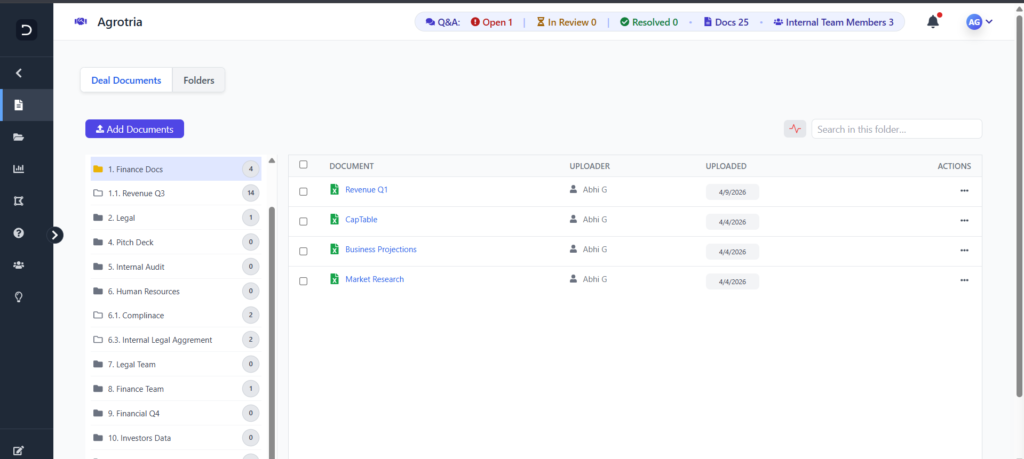
Before diving into the step-by-step process, it’s helpful to understand what a well-built data room should include and how it supports business operations across industries.
Quick Overview Table: Data Room Setup Essentials
| Step | Action | Purpose | Outcome |
|---|---|---|---|
| 1 | Create Account & Workspace | Initialize your environment | Secure base for operations |
| 2 | Structure Folders | Organize documents logically | Easy navigation |
| 3 | Upload Documents | Add files securely | Centralized storage |
| 4 | Set Permissions | Control access levels | Data protection |
| 5 | Share Access | Invite stakeholders | Controlled collaboration |
Understanding the Importance of Data Rooms
A Virtual Data Room is more than just a storage solution—it is a controlled environment designed for secure document sharing and tracking. Businesses across industries rely on Virtual Data Rooms to manage sensitive transactions, especially in scenarios like fundraising, due diligence, and compliance audits.
The rise of digital transactions has made it critical to adopt platforms that provide both accessibility and control. DeelTrix, as a modern VDR, ensures that businesses can manage documents efficiently while maintaining full visibility over user activity. This is particularly valuable in VDR for M&A and VDR for Fundraising scenarios, where document security and tracking are non-negotiable.
Step 1: Create Your DeelTrix Account and Workspace
The first step in learning How to Create a Data Room is setting up your workspace on DeelTrix. This process is designed to be intuitive, allowing users to get started within minutes without technical complexity.
Once registered, you can create a new workspace that acts as the foundation for your data room. This workspace becomes the central hub where all documents, users, and activities are managed. DeelTrix ensures that each workspace is isolated and secure, providing a reliable environment for handling sensitive data.
For businesses managing multiple deals, this step is crucial as DeelTrix allows the creation of multiple Data Rooms without restrictions, making it ideal for scaling operations.
Step 2: Structure Your Data Room Efficiently
After setting up your workspace, the next step in How to Create a Data Room is organizing your folder structure. A well-structured data room ensures that users can easily find and access documents without confusion.
Here’s how to structure effectively:
- Create Main Categories
Examples include Financials, Legal, Operations, and Marketing. - Add Subfolders
Break down categories into more specific sections for clarity. - Use Consistent Naming Conventions
Maintain uniformity to avoid duplication and confusion. - Prioritize Key Documents
Place critical files in easily accessible locations.
This step is especially important in VDR for Startups, where investors expect quick and clear access to essential documents.
Step 3: Upload and Manage Documents
Uploading documents is a core part of How to Create a Data Room, and DeelTrix makes this process seamless. You can upload files individually or in bulk, ensuring that large volumes of data are handled efficiently.
Key considerations during this step:
- Ensure documents are up-to-date and accurate
- Use clear file names for easy identification
- Organize files within the predefined folder structure
- Avoid duplicate uploads to maintain clarity
DeelTrix also supports various file formats, making it suitable for diverse business needs. Whether you are preparing a VDR for M&A or managing internal operations, having all documents centralized improves efficiency and reduces errors.
Step 4: Set Permissions and Access Controls
Security is a critical aspect of How to Create a Data Room, and this is where permission settings come into play. DeelTrix allows you to define exactly who can view, download, or edit documents.
Key permission settings include:
- View-Only Access
Users can view documents but cannot download or edit them. - Download Permissions
Allow selective downloading for specific users. - Restricted Access
Limit access to certain folders or files. - Time-Based Access
Set expiration dates for user access.
These controls are essential in Virtual Data Rooms, especially when dealing with external stakeholders. They ensure that sensitive information remains protected while still being accessible to authorized users.
Step 5: Share Your Data Room Securely
The final step in How to Create a Data Room is sharing access with stakeholders. DeelTrix enables secure sharing through controlled invitations and access links.
Best practices for sharing:
- Invite users via email with predefined permissions
- Use secure links with expiration settings
- Monitor user activity after sharing
- Revoke access when no longer needed
This step is particularly important in VDR for Fundraising, where multiple investors may need access to the same documents. DeelTrix ensures that every interaction is tracked, providing valuable insights into user engagement.
Advanced Features That Enhance Your Data Room
Once you complete the basic setup, DeelTrix offers advanced features that elevate your data room experience.
Key Enhancements That Elevate Modern Data Rooms
When building a high-performing Virtual Data Room, basic storage and sharing capabilities are no longer sufficient. Businesses now require advanced features that enhance security, visibility, and collaboration. DeelTrix integrates these enhancements directly into its platform, making it a powerful VDR for organizations managing complex workflows across multiple Data Rooms.
These capabilities are especially valuable in use cases like VDR for M&A, VDR for Startups, and VDR for Fundraising, where precision, control, and speed are critical. Below is a deeper look at the key enhancements that make DeelTrix stand out among modern Virtual Data Rooms.
Feature Comparison Table
| Feature | Core Function | Key Benefit | Use Case Impact |
|---|---|---|---|
| Dynamic Watermarking | Adds user-specific identifiers to documents | Prevents leaks and ensures accountability | Critical in VDR for M&A |
| Audit Trails | Logs all user actions | Full transparency and compliance | Essential for regulated industries |
| Analytics Dashboard | Tracks engagement and activity | Data-driven decision making | Valuable in VDR for Fundraising |
| Collaboration Tools | Enables real-time interaction | Improves team efficiency | Ideal for VDR for Startups |
1. Dynamic Watermarking
Dynamic Watermarking is a cornerstone feature in any secure Virtual Data Room. DeelTrix uses this capability to embed unique, user-specific identifiers directly onto documents, ensuring that every file is traceable.
Key advantages include:
- User-Level Accountability
Each document is marked with viewer-specific details such as email or timestamp. - Leak Prevention
Visible identifiers discourage users from sharing or misusing sensitive files. - Customizable Watermarks
Businesses can define what information appears on each document. - Real-Time Application
Watermarks are applied instantly when a file is accessed or downloaded.
This feature is particularly important in VDR for M&A, where confidential financial and legal documents are shared with multiple stakeholders. DeelTrix ensures that even if a document is leaked, its source can be easily traced.
2. Audit Trails
Audit Trails provide a complete record of every action taken within a Virtual Data Room. DeelTrix automatically logs user activities, creating a transparent and verifiable history of interactions.
Key benefits include:
- Full Visibility
Track who accessed, viewed, or downloaded each document. - Compliance Support
Helps meet regulatory requirements in industries like finance and healthcare. - Security Monitoring
Identify unusual or suspicious activity quickly. - Accountability Across Teams
Ensure all stakeholders follow proper protocols.
For organizations using Data Rooms in regulated environments, audit trails are not optional—they are essential. DeelTrix ensures that every action within the VDR is recorded and easily accessible for review.
3. Analytics Dashboard
One of the most powerful features of DeelTrix is its advanced Analytics Dashboard. Unlike traditional Virtual Data Rooms, which offer limited visibility, DeelTrix provides detailed insights into document engagement and user behavior.
Key insights provided:
- Document View Tracking
See which files are being accessed the most. - User Engagement Metrics
Identify the most active stakeholders. - Time Spent Analysis
Understand how long users interact with specific documents. - Engagement Trends
Track patterns over time to optimize document strategy.
This feature is especially valuable in VDR for Fundraising, where understanding investor interest can directly influence follow-up strategies. DeelTrix enables businesses to prioritize high-interest leads based on real data.
4. Collaboration Tools
Collaboration is a critical component of any modern Virtual Data Room. DeelTrix enhances teamwork by providing built-in tools that allow users to communicate and interact directly within the platform.
Key collaboration features:
- Comments and Annotations
Users can leave feedback directly on documents. - Real-Time Updates
Changes and discussions are visible instantly to all relevant users. - Centralized Communication
Keeps all discussions within the VDR, reducing reliance on external tools. - Version Control
Ensures that users always access the latest version of a document.
These tools are particularly beneficial in VDR for Startups, where teams and investors need to collaborate efficiently without compromising security. DeelTrix ensures that communication remains structured and accessible.
How These Enhancements Work Together
Individually, each feature within a Virtual Data Room delivers value, but the real power emerges when they operate as a unified system. DeelTrix brings together security, analytics, and collaboration into a seamless ecosystem, eliminating the need for fragmented tools. This integration ensures that businesses using a VDR can manage complex workflows efficiently while maintaining complete control over their data.
In modern Virtual Data Rooms, switching between multiple platforms for security, tracking, and communication often leads to inefficiencies and increased risk. DeelTrix removes this friction by combining all critical capabilities into one interface. This makes it especially effective for organizations managing multiple Data Rooms simultaneously, whether for VDR for M&A, VDR for Startups, or VDR for Fundraising.
Combined Impact of Integrated Features
1. Stronger Security Framework
Security becomes significantly more robust when multiple layers work together within a Virtual Data Room. DeelTrix integrates Dynamic Watermarking with Audit Trails to create a comprehensive protection system.
- Dynamic Watermarking ensures that every document is tagged with user-specific identifiers, discouraging unauthorized sharing.
- Audit Trails record every action, providing full visibility into who accessed or modified files.
- Granular Permissions further restrict access based on roles and responsibilities.
Together, these features create a proactive security environment rather than a reactive one. This is particularly critical in VDR for M&A, where sensitive financial and legal documents are shared with multiple external parties. DeelTrix ensures that all interactions are both protected and traceable across Virtual Data Rooms.
2. Improved Decision-Making
Data without insights has limited value, which is why the Analytics Dashboard plays a crucial role in the ecosystem. DeelTrix transforms raw activity data into actionable intelligence that supports better decision-making.
- Track which documents receive the most attention
- Identify high-interest stakeholders based on engagement
- Analyze time spent on specific files
- Monitor trends across different Data Rooms
In VDR for Fundraising scenarios, this insight allows businesses to prioritize investors who show genuine interest. Instead of relying on guesswork, teams can use real data to guide follow-ups and strategy. This makes DeelTrix not just a storage solution, but a decision-enabling VDR.
3. Enhanced Collaboration
Collaboration is often where traditional systems fail, especially when dealing with external stakeholders. DeelTrix addresses this by embedding communication tools directly within the Virtual Data Room.
- Comments and Annotations allow users to provide feedback on specific documents
- Real-Time Updates ensure that all participants stay aligned
- Centralized Discussions reduce dependency on emails and external tools
- Version Control prevents confusion by maintaining a single source of truth
This is particularly beneficial in VDR for Startups, where founders, investors, and advisors need to collaborate efficiently. By keeping all interactions within the platform, DeelTrix ensures that communication remains organized and secure across Virtual Data Rooms.
4. Operational Efficiency
One of the biggest advantages of integrating these features is the improvement in overall workflow efficiency. DeelTrix eliminates redundancies by centralizing all key functions within a single VDR.
Key efficiency gains include:
- Reduced Tool Dependency
No need to switch between multiple platforms for storage, communication, and analytics. - Faster Processes
Real-time updates and centralized access reduce delays in decision-making. - Simplified Management
Admins can control permissions, monitor activity, and manage documents from one dashboard. - Scalable Operations
Easily manage multiple Data Rooms without performance issues.
This level of efficiency is essential for businesses handling multiple projects simultaneously, especially in high-pressure environments like VDR for M&A and VDR for Fundraising.
Unified Ecosystem Advantage
The true strength of DeelTrix lies in how these features complement each other within a single Virtual Data Room environment. Instead of functioning as isolated tools, they form a cohesive system that enhances every aspect of document management.
Key advantages of this integration:
- Consistency Across Workflows
All processes follow the same structure, reducing confusion. - Higher Productivity
Teams spend less time managing tools and more time focusing on outcomes. - Better User Experience
A unified interface makes it easier for both internal teams and external stakeholders to navigate. - Scalable Infrastructure
Supports growth without requiring system changes.
For organizations managing multiple Virtual Data Rooms, this unified approach ensures that operations remain smooth and scalable. DeelTrix enables businesses to maintain control, improve collaboration, and drive better results—all within a single, powerful VDR environment.
Why These Features Matter in Real Scenarios

In real-world applications, these enhancements significantly improve outcomes:
- In VDR for M&A, secure sharing and tracking ensure smooth due diligence processes.
- In VDR for Fundraising, analytics help identify serious investors and optimize engagement.
- In VDR for Startups, collaboration tools enable faster communication and decision-making.
By combining security, analytics, and collaboration, DeelTrix sets a new benchmark for Virtual Data Rooms, making it a reliable choice for businesses of all sizes.
Common Mistakes to Avoid
Even with the right tools, mistakes can reduce the effectiveness of your data room. Understanding these pitfalls is essential when learning How to Create a Data Room.
- Poor Organization
Disorganized folders make it difficult for users to find documents. - Over-Permissioning
Granting excessive access increases security risks. - Outdated Documents
Sharing incorrect information can harm credibility. - Lack of Monitoring
Failing to track activity reduces visibility into user behavior.
Avoiding these mistakes ensures that your data room remains efficient and secure.
Why DeelTrix Is Ideal for Modern Businesses
DeelTrix stands out as a powerful VDR designed for today’s business needs. Its combination of scalability, security, and usability makes it suitable for various use cases.
Whether you are setting up a VDR for M&A, managing investor relations, or organizing internal workflows, DeelTrix provides the tools needed to succeed. Its ability to handle multiple Data Rooms simultaneously makes it particularly valuable for growing businesses.
Additionally, its intuitive interface ensures that even first-time users can quickly understand How to Create a Data Room without technical expertise.
Final Thoughts
Mastering How to Create a Data Room is essential for businesses looking to operate efficiently in a digital-first world. With the right platform and approach, organizations can streamline document management, enhance security, and improve collaboration.
DeelTrix simplifies this process by offering a comprehensive solution that meets the demands of modern workflows. From setup to sharing, every step is designed to be intuitive and secure, ensuring that businesses can focus on what matters most—closing deals and driving growth.
FAQ’s
What is the purpose of a Virtual Data Room?
A Virtual Data Room is used to securely store, manage, and share sensitive documents with controlled access and full tracking capabilities.
How long does it take to set up a data room in DeelTrix?
It typically takes a few minutes to create and configure a data room, depending on the number of documents and users involved.
Can startups benefit from using a VDR?
Yes, VDR for Startups is highly beneficial as it helps organize investor documents and improves transparency during fundraising.
Is DeelTrix secure for sensitive document sharing?
Yes. DeelTrix is ISO Certified and ensure data residency by allowing user select their data room location for file storage.
What industries use Virtual Data Rooms the most?
Industries such as finance, legal, healthcare, and real estate frequently use Virtual Data Rooms for secure document management and sharing.
How to Create a Data Room for fundraising purposes?
To understand how to create a data room for fundraising, start by organizing key documents like pitch decks, financials, and projections. Platforms like DeelTrix help structure these files and provide secure access to investors while tracking engagement.
How to Create a Data Room for M&A transactions?
When learning how to create a data room for M&A, focus on structuring financial, legal, and operational documents clearly. Using a VDR ensures secure sharing and detailed tracking throughout the due diligence process.
How to Create a Data Room with proper folder structure?
A key part of how to create a data room is building a logical folder hierarchy. Group documents into categories like financials, legal, and operations to make navigation easy for stakeholders.
How to Create a Data Room that ensures document security?
If you’re exploring how to create a data room securely, use features like access controls, encryption, and dynamic watermarking. DeelTrix provides these capabilities to protect sensitive information.
How to Create a Data Room for startups?
Understanding how to create a data room for startups involves preparing investor-ready documents and organizing them clearly. A VDR helps startups present data professionally and build investor confidence.
How to Create a Data Room with user permissions?
An important step in how to create a data room is assigning permissions. Define who can view, download, or edit documents to maintain control over sensitive data.
How to Create a Data Room and share it with stakeholders?
When learning how to create a data room for sharing, use secure invitation links and role-based access. This ensures only authorized users can access the information.
How to Create a Data Room that supports collaboration?
To master how to create a data room for collaboration, choose a platform that allows comments, annotations, and real-time updates. This helps teams and stakeholders stay aligned.
How to Create a Data Room and track user activity?
A critical aspect of how to create a data room is enabling tracking features. Analytics dashboards in DeelTrix allow you to monitor document views and user engagement.
How to Create a Data Room quickly without technical expertise?
If you’re wondering how to create a data room easily, modern platforms like DeelTrix offer intuitive interfaces that allow setup within minutes, even for non-technical users.