Datasite VDR: Best alternative with better features!
In today’s fast-paced world of mergers, acquisitions, and fundraising, deal management depends on secure and efficient collaboration. Businesses can no longer afford to share sensitive files through unsecured emails or cloud folders. They need structured, compliant, and intelligent virtual data room software that simplifies communication, enhances visibility, and speeds up decision-making.

When it comes to choosing between Datasite VDR and DeelTrix, both platforms provide robust tools for document sharing and deal execution. However, the difference lies in their approach, accessibility, and cost-efficiency. DeelTrix has emerged as a new-generation deal VDR built for speed, collaboration, and simplicity—especially for small teams and startups. Meanwhile, Datasite VDR remains a legacy player trusted for enterprise-level due diligence and compliance.
This blog compares both solutions feature by feature to help you identify which virtual deal room truly offers the best value for your next transaction.
1. Purpose-Built for Fundraising, M&A & Due Diligence
Both DeelTrix and Datasite VDR are designed to handle large-scale corporate transactions such as mergers, acquisitions, and investment rounds. DeelTrix was built specifically for fundraising, M&A, and due diligence workflows, offering predefined folder structures and templates tailored for these processes.
Datasite VDR, while also supporting M&A, focuses heavily on traditional enterprise deals, often making it less flexible for smaller or faster-paced organizations. DeelTrix, on the other hand, adapts seamlessly across different transaction types, making it a more versatile virtual data room solution for startups and growing firms.
2. Granular Document Permissions
Confidentiality is one of the most important requirements in any M&A transaction. Buyers, sellers, advisors, lawyers, and financial teams may all need access to the same data room, but they rarely need identical permissions. A modern VDR should therefore allow administrators to control not only who can access a document, but also what that user can do with it.
DeelTrix provides granular document permissions with flexible View Only, Print, and Download controls. This gives administrators greater control over how sensitive information is consumed and shared throughout a transaction.
View, Print, or Download

With DeelTrix, administrators can determine the appropriate permission for individual users or groups:
| Permission | What It Allows | Key Benefit |
|---|---|---|
| View Only | User can view the document inside the data room | Useful for highly confidential information that should not be downloaded |
| User can print the document | Allows physical review while maintaining document controls | |
| Download | User can download the document | Useful when stakeholders need an offline copy |
| Print + Watermark | User can print a protected copy with watermarking | Helps preserve confidentiality even when documents leave the digital environment |
This level of control is particularly useful when comparing Datasite VDR with DeelTrix. Rather than applying a broad permission to an entire group of users, deal administrators can structure access according to the sensitivity of specific documents.
How Print With Watermark Works
Printing sensitive documents can create an additional confidentiality challenge. Once information is printed, it is no longer protected by the digital data room interface in the same way.
DeelTrix addresses this by allowing administrators to enable watermarking for printed documents. When a user prints a protected document, the resulting copy can include the configured watermark, helping identify the document and reinforce its confidential nature.
This creates an additional layer of protection for transaction documents that need to be physically reviewed.
Real M&A Example
Consider a company going through an M&A process with three potential buyers.
The seller uploads:
- Financial statements
- Customer contracts
- Employee information
- Intellectual property documents
- Management presentations
- Detailed financial models
The seller may decide that buyers can view financial models online but cannot download them. Legal documents may be available for viewing and printing, while a management presentation may be available for download.
For highly sensitive contracts, the administrator can enable Print + Watermark. If a buyer prints the contract, the printed version carries the configured watermark, helping maintain a clear connection to the controlled transaction environment.
This gives the seller more flexibility than simply choosing between “access” and “no access.”
Why This Matters Compared With Datasite VDR
Datasite VDR also provides document permission controls designed for secure transactions. However, businesses evaluating Datasite VDR alternatives may want to consider how easily permissions can be adapted to different documents and stakeholder requirements.
DeelTrix is designed for dynamic deal environments where permissions may change frequently. An administrator can adjust access as buyers move from initial review to deeper due diligence.
For example:
- Initial review: View Only
- Advanced diligence: View + Download
- Physical legal review: View + Print
- Sensitive printed documents: Print with Watermark
- Highly restricted information: View Only with no download
This flexibility can help M&A teams balance accessibility with confidentiality.
Why DeelTrix Is Useful for Modern Deal Teams
When comparing Datasite VDR, teams should look beyond basic access management and examine how precisely they can control individual document actions.
DeelTrix provides:
- Granular folder and document permissions
- View Only controls
- Print permissions
- Download permissions
- Print with Watermark
- Custom watermarking
- Group-based access management
- Flexible permission changes
For teams evaluating Datasite VDR, this level of control can be especially valuable when different buyers or advisors require different levels of document access.
Ultimately, Datasite VDR can support structured enterprise transactions, but DeelTrix provides a flexible approach for teams that need precise control over how confidential documents are viewed, printed, and downloaded.
For dynamic M&A and fundraising processes, Datasite VDR alternatives such as DeelTrix can help administrators maintain stronger control without unnecessarily slowing down legitimate document review.
3. Data Room Structure
The way a virtual deal room is organized determines how easily users can navigate and find information. Both DeelTrix and Datasite VDR support structured folders, but DeelTrix takes it further with multiple data room support within one account.
This means users managing several deals can switch between rooms effortlessly without losing context. Datasite VDR, by contrast, supports only single-room structures per project, which can slow things down when managing parallel transactions.
For professionals frequently setting up a data room, DeelTrix’s flexibility saves hours of reconfiguration.
4. Real-Time Analytics
Analytics can help M&A and fundraising teams understand what is happening inside a data room while a transaction is still active. Instead of waiting until the end of a process to review activity, administrators can use engagement information to identify active stakeholders, understand document interest, and decide where follow-up may be needed.
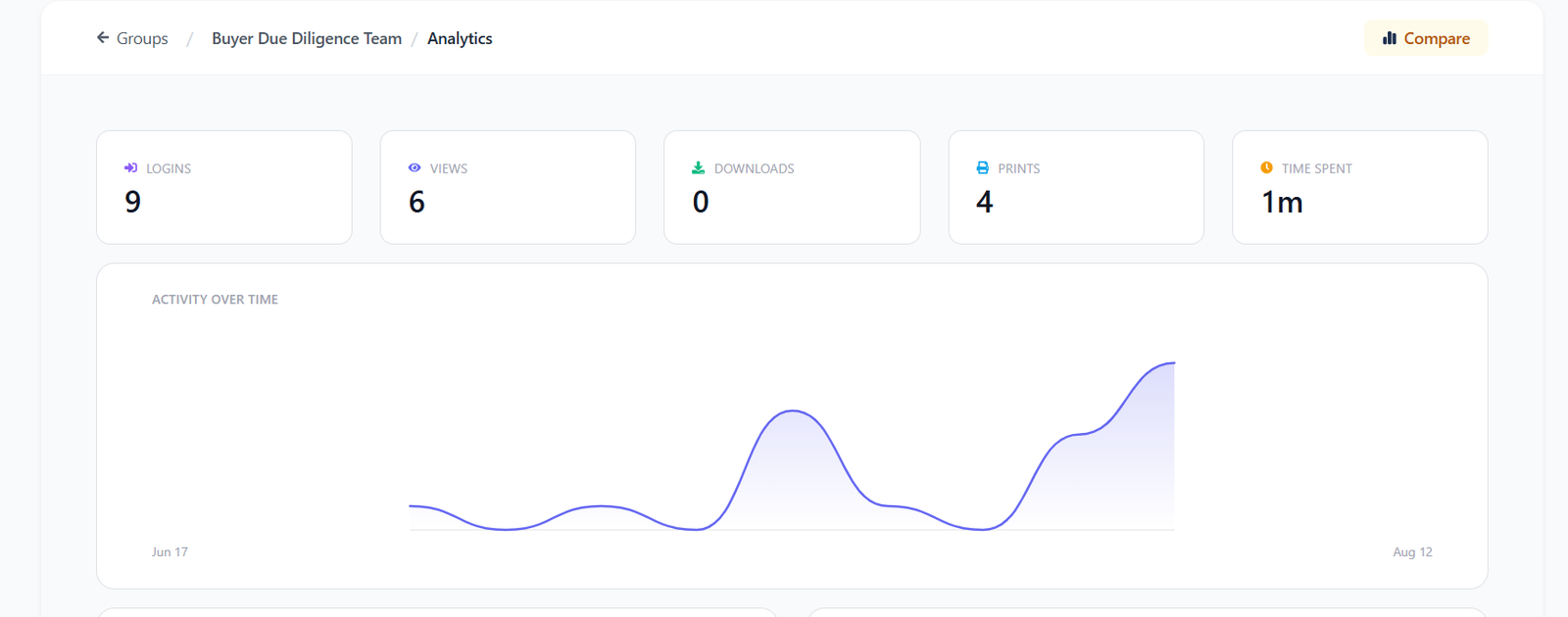
DeelTrix combines real-time analytics with Group Analytics, giving administrators visibility at both the individual and group level. This can make engagement data more actionable when comparing DeelTrix with Datasite VDR.
How DeelTrix Group Analytics Works
The key advantage is the ability to compare different stakeholder groups inside the same data room.
For example, an M&A advisor could create groups for:
- Buyer A
- Buyer B
- Buyer C
- Legal Advisors
- Financial Advisors
The administrator can then monitor activity across these groups and identify differences in engagement.
| Group Analytics Insight | How It Helps |
|---|---|
| Group activity | Shows how actively each group is engaging with the data room |
| Document views | Identifies which groups are reviewing important materials |
| Download activity | Highlights groups taking documents for further analysis |
| Engagement movement | Helps track how group activity changes over time |
| Document interest | Shows which materials attract attention from each group |
| Group comparison | Helps administrators compare buyer or investor engagement |
| Deal progress signals | Provides additional context for prioritizing follow-ups |
Real M&A Example
Suppose three buyers are reviewing a company for acquisition. Buyer A has opened 80% of the financial documents, Buyer B is primarily reviewing commercial contracts, and Buyer C has very limited activity.
With DeelTrix Group Analytics, the advisor can compare these groups rather than manually reviewing every user’s activity.
This may help the advisor determine:
- Which buyer is most actively reviewing the opportunity
- Which document categories are attracting attention
- Whether engagement is increasing or declining
- Which group may require follow-up
- How buyer activity changes as diligence progresses
This does not replace direct conversations or formal bidding decisions, but it gives the deal team an additional source of actionable information.
DeelTrix vs. Datasite VDR
Datasite VDR provides analytics and reporting capabilities for transaction activity. However, teams looking for more dynamic visibility may want to evaluate how quickly they can interpret activity and compare stakeholder groups.
With DeelTrix, administrators can use the dashboard and Group Analytics to monitor movement inside the data room without relying entirely on exported reports.
For teams comparing Datasite VDR, the ability to see group-level engagement can be particularly valuable when several buyers or investors are involved.
Why Real-Time Visibility Matters
A Datasite VDR workflow can provide valuable transaction reporting, but modern deal teams increasingly want analytics they can act on while the transaction is underway.
DeelTrix connects real-time analytics + Group Analytics + document engagement to provide a clearer view of transaction activity.
For businesses evaluating Datasite VDR alternatives, this combination can make DeelTrix a strong option for teams that want to understand not only who accessed the data room, but how different groups are progressing through it.
Ultimately, Datasite VDR can support structured transaction reporting, while DeelTrix emphasizes live engagement visibility and group-level comparison. For active M&A and fundraising processes, that additional visibility can help deal teams prioritize communication and keep the transaction moving.
5. Collaboration Tools
Collaboration is the biggest differentiator between DeelTrix and Datasite VDR. DeelTrix offers in-platform Q&A sections, comment threads, and real-time team collaboration. This means that investors, legal advisors, and internal teams can communicate directly within the deal VDR instead of relying on separate email chains.
Datasite VDR, on the other hand, lacks integrated collaboration tools. Users must rely on external communication platforms to discuss files or clarify due diligence points.
For teams handling rapid negotiations, DeelTrix provides a smoother and more connected virtual deal room experience.
6. Multi-User & Role Management
DeelTrix allows detailed role management with distinct user types such as Admin, Contributor, and Viewer. Each role carries specific permissions, ensuring clarity and control throughout the deal.
Datasite VDR lacks this granular role-based system. It primarily supports link-based sharing, which can become difficult to manage in large teams where multiple roles overlap.
This feature alone positions DeelTrix as the more advanced virtual data room software for teams prioritizing structured collaboration and data security.
7. Dynamic Watermarking
Both DeelTrix and Datasite VDR offer dynamic watermarking for documents, which embeds user-specific details like email and timestamp on viewed or downloaded files.
This feature is crucial for maintaining accountability during due diligence and M&A activities. Both platforms perform equally well here, ensuring traceability and protection of sensitive information.
However, DeelTrix integrates watermarking more seamlessly into its virtual data room solution, allowing administrators to apply it across documents in one click rather than per upload.
8. One-Click Update
DeelTrix introduces a unique innovation called One-Click Update, which allows admins to notify all stakeholders instantly about document uploads, revisions, or updates.
Datasite VDR lacks this functionality, requiring users to manually send alerts or share links every time a file changes.
In high-velocity deals, where updates happen hourly, DeelTrix’s one-click automation eliminates communication delays, keeping everyone aligned and informed in real time.
9. Document Support
Both DeelTrix and Datasite VDR support multiple document types — PDFs, Excel sheets, PowerPoints, and Word files.
The difference lies in user experience. DeelTrix allows in-platform previews and annotations across all file formats, while Datasite VDR users often need to download files before viewing them fully.
By supporting a broader range of file interactions, DeelTrix ensures that its deal VDR remains both accessible and convenient for modern teams.
10. Custom Branding
Brand presentation plays a subtle but important role in professional dealmaking. DeelTrix allows complete customization of its virtual deal room, including company logos, themes, and brand colors.
Datasite VDR only offers limited customization, such as adding a company logo. For firms managing multiple investors or clients, DeelTrix’s full branding capabilities deliver a more polished and professional experience.
This feature helps organizations present their virtual data room solution as an extension of their brand, building trust and credibility with stakeholders.
11. Secure Viewing and Access Controls
Both DeelTrix and Datasite VDR excel at secure document viewing. They include view-only modes, download blocking, and watermark overlays to prevent unauthorized sharing.
However, DeelTrix enhances this with layered access control and expiration features. Administrators can restrict document visibility after specific dates or events, providing extra flexibility in setting up a data room for time-sensitive deals.
This small yet crucial capability makes DeelTrix more adaptable in scenarios like multi-phase due diligence or staged investor rollouts.
12. Notifications and Alerts
Staying informed during deal execution is essential. Both DeelTrix and Datasite VDR provide notifications for key actions such as document uploads and views.
The difference lies in how these alerts are managed. DeelTrix offers instant, real-time push notifications for document access, downloads, and comments — ensuring users are always in sync.
Datasite VDR provides basic alerts but lacks the customization and immediacy of DeelTrix’s system. For teams that prioritize agility and responsiveness, DeelTrix delivers a more proactive experience.
13. Compliance and Audit Trails
Compliance is mandatory for all serious deal VDR platforms. Both DeelTrix and Datasite VDR maintain comprehensive audit trails and comply with GDPR standards.
DeelTrix records every login, view, and edit with timestamp precision. These logs can be exported instantly for audits or regulatory reviews. Datasite VDR also provides reliable logging, though with slightly less flexibility in filtering and exporting data.
For organizations that need transparency across multiple deals, DeelTrix’s audit capabilities make it the more versatile virtual data room solution.
14. Trial Access
Both platforms offer trial access. DeelTrix provides a free trial without restrictions, allowing users to experience all core features of the deal VDR before purchase.
Datasite VDR also offers trials, but often with limited functionality or shorter duration. DeelTrix’s open trial model demonstrates confidence in its usability and performance, giving teams a better chance to explore its features before committing.
15. Pricing and Value
Pricing is where DeelTrix truly differentiates itself. Traditional providers like Datasite VDR typically charge per user, per room, or per page — a model that can become expensive as deals scale.
DeelTrix adopts a startup-friendly approach: no per-room or per-page charges, transparent monthly pricing, and unlimited data rooms under one subscription. This flexibility makes DeelTrix ideal for both small firms and large enterprises managing multiple simultaneous transactions.
When comparing overall virtual data room cost, DeelTrix clearly provides better long-term value without compromising on capability or security.
Feature Comparison Summary
| Feature / Capability | DeelTrix | Datasite VDR |
|---|---|---|
| Purpose-Built for Fundraising, M&A & Due Diligence | Yes – designed specifically for M&A, fundraising, and due diligence workflows | Yes |
| Granular Document Permissions | Advanced (view, download, watermark, expire per user) | Yes |
| Data Room Structure | Hierarchical folders & multiple data rooms | Hierarchical folders |
| Real-Time Analytics | Analytics support – who viewed, for how long, which page | Deep analytics – who viewed, for how long, which page |
| Collaboration Tools | Comments, Q&A section, team collaboration | No collaboration features |
| Multi-User & Role Management | Admin, Viewer, Contributor roles | No role-based access (link sharing only) |
| Dynamic Watermarking | Support dynamic watermarking | Support dynamic watermarking |
| One-Click Update | Keep internal teams & room users updated instantly | Not available |
| Document Support | Multiple document type support | Multiple document type support |
| Custom Branding | Logo and theme customization | Limited logo customization |
| Secure Viewing | Dynamic watermarking, view-only mode, download block | Dynamic watermarking, view-only mode, download block |
| Notifications | Instant alerts for views, downloads, comments | Basic notifications |
| Compliance & Audit Trail | Full audit logs, GDPR-compliant | Full audit logs, GDPR-compliant |
| Trial | Yes | Yes |
| Pricing | Startup-friendly, no per-room/per-page cost | Per-user pricing can get expensive |
Conclusion: DeelTrix Delivers Greater Flexibility and Value
Both DeelTrix and Datasite VDR provide secure environments for managing confidential information during M&A, fundraising, due diligence, and other complex transactions. However, the requirements of modern deal teams are changing. Businesses increasingly want more than secure document storage—they need flexible permissions, stakeholder management, engagement analytics, collaboration, and predictable administration.
This is where DeelTrix provides a compelling alternative. Its virtual deal room combines document security with features designed to simplify the day-to-day management of active transactions. Rather than treating the data room as a static repository, DeelTrix helps teams manage users, understand engagement, communicate updates, and organize deal workflows from one environment.
Why DeelTrix Provides Greater Flexibility
One of DeelTrix’s strongest differentiators is its Groups feature. Instead of managing access individually for every buyer, investor, advisor, or internal employee, administrators can create groups with predefined access and permission levels.
This becomes especially valuable when transactions involve many stakeholders.
Key benefits include:
- Faster permission management — Create access rules for a group rather than configuring every user individually.
- Easy user movement — Move users between groups as their role or transaction stage changes.
- Better information control — Different groups can receive access to different folders or documents.
- Group-level analytics — Understand how an entire buyer or investor group is engaging with transaction materials.
- Simpler administration — Reduce repetitive permission changes as the transaction evolves.
- More actionable insights — Compare engagement between different stakeholder groups.
Real M&A Example
Consider an M&A transaction where a seller is evaluating three potential buyers.
Buyer A has five team members, Buyer B has eight, and Buyer C has six. Each buyer requires access to financial, commercial, and legal information, but certain documents may need to remain restricted.
With DeelTrix, the administrator can create separate groups:
- Buyer A Group
- Buyer B Group
- Buyer C Group
The administrator can assign the appropriate document permissions to each group. If Buyer A moves into deeper due diligence, users can be moved into a more comprehensive diligence group instead of having their permissions individually rebuilt.
The advisor can then use Group Analytics to compare engagement. If Buyer A is consistently reviewing financial models and commercial documents while Buyer C has limited activity, the advisor gains an additional signal when deciding where to focus follow-up conversations.
This makes the virtual data room more than a secure document repository—it becomes a useful part of the deal-management workflow.
Real Fundraising Example
The Groups feature is equally useful during fundraising.
Imagine a startup has 30 prospective investors divided into three stages:
- Initial Interest: Pitch deck and company overview
- Active Discussions: Pitch deck, financial model, market analysis
- Due Diligence: Financial, legal, commercial, and operational documents
Instead of manually managing access for all 30 investors, the founder can organize them into corresponding DeelTrix Groups.
As an investor progresses from an introductory conversation to detailed diligence, the administrator can move that investor into the appropriate group.
Group Analytics can then help the fundraising team understand which investor groups are actively engaging with materials. This can help founders prioritize outreach while keeping sensitive information appropriately controlled.
DeelTrix vs. Datasite VDR
| Requirement | DeelTrix | Datasite VDR |
|---|---|---|
| Secure document sharing | ✓ | ✓ |
| Granular access | ✓ | ✓ |
| Data Room Groups | ✓ | Transaction-focused workflows |
| Group-level engagement visibility | ✓ | Analytics-focused capabilities |
| Q&A management | ✓ | ✓ |
| Document analytics | ✓ | ✓ |
| Notifications and admin notes | ✓ | ✓ |
| Regional storage options | ✓ | Available options vary |
| Flexible deal administration | ✓ | Strong enterprise orientation |
| Modern startup/advisor workflow | ✓ | More enterprise-focused |
Why This Matters for Modern Deal Teams
For organizations comparing Datasite VDR with newer VDR platforms, the decision should not be based solely on security or brand recognition. Teams should consider how efficiently the platform handles the entire transaction lifecycle.
DeelTrix brings together:
- Secure document sharing
- Granular folder and document access
- Data Room Groups
- Group Analytics
- Q&A Management
- Notifications
- Custom watermarking
- NDA gating
- Audit exports
- Team collaboration
The result is a virtual data room software experience designed around how modern M&A and fundraising teams actually work.
Final Takeaway
Datasite VDR remains a capable option for organizations with complex enterprise transaction requirements. However, teams that prioritize flexibility, simpler administration, stakeholder-level analytics, collaboration, and transparent value may find DeelTrix a stronger fit.
The combination of Groups + permissions + analytics is particularly valuable because it connects two important parts of a transaction: controlling who can access information and understanding how those stakeholders engage with it.
For businesses looking to accelerate transactions, reduce administrative effort, and maintain greater control, DeelTrix offers a modern virtual deal room approach—helping define what a flexible and practical best VDR experience can look like.
Share investor decks securely with live updates, page analytics, and instant revocation controls.
Organize financials, contracts, and compliance docs in one secure room with audit trails.
Control sensitive contracts and regulatory files with watermarking and access restrictions.
Send proposals with engagement signals and track which sections prospects value most.
Distribute reports with visibility into reader activity and keep conversations in-platform.